Showing posts with label IBLs. Show all posts

Friday, 27 June 2014

Week 37: IBLs

This task's been a good one...

The IBLs for the library/Beach:


The Library Door (as seen before).


Desk/Window


Walkway 01


Walkway 02


Beach


From taking the images and creating the panoramas, I've really enjoyed this task. Now to take these chaps into Maya and start putting the scenes and render layers together.


Wednesday, 18 June 2014

Week 36: IBL for Doorway

To get the door scene started, I put texturing on hold for a few hours and got the IBL for the doorway created:


This is the scene where the magic happens and this is the image we'll be using to light the scene.


I have genuinely enjoyed this process and I'm quite eager to get the others done asap.
Watch this space; more IBLs coming soon.


Monday, 24 February 2014

Week 22: Mastronauts - IBLs and Sibl Gui

Word of mouth introduced me to a program called Sibl Gui. The program is focused on creating an image-based light set up using HDR images. It can be plugged into many 3D softwares such as Maya.

Using this software, I investigated and tested IBL set ups to see the impact that image-based lighting can have on the integration of CG elements in live-action environments.


Using HDRs downloaded from the Sibl Archive online as environments, I created sphere's with specific shaders - one a chrome ball to test reflections and the other a lambert, to see the effect that IBLs have on indirect lighting.


I then used this software to test my own IBL of the DJCAD entrance.


This is an image of the same spheres, as seen above, without the reflection and indirect light applied to them from the IBL. They have not, in any way, been lit at all; I am only using Maya's default light in this example.


This is a comparison displaying the IBL being applied to the sphere's in both reflection (chrome) and indirect light (lambert) and we can see that their is a significant difference in the integration of the CG elements with the photographed environment.


After this test, I realised that I had not actually centered the horizon line of my panorama and so the image is slanted. This is a minor issue and is very easily fixed and so I will likely tweak this test whenever I get the chance.


Friday, 21 February 2014

Week 21: Mastronauts - IBL Progress

So after the meeting yesterday, Tom, Kieran and I also decided to begin a little proof-of-concept test involving tracking a live action shot, adding CG elements, lighting, rendering and compositing. This is to ensure we get a basic understanding of the tasks ahead and to understand some of the issues we may encounter.


                                                                                               (The Mastronauts 2014)


So we cracked out the fish eye lense and took images of the entrance of DJCAD and more outside to get a test of both an interior and exterior envinronments. We took some video footage and took images for the IBLs to use for the tests. There was, unfortunately an issue with the footage, after shooting we realised the footage was interlaced and this meant it had to be re-shot.

Eventually, we got there and now we can get on and prepare everything for doing some tests...and for me,that means trying my hand at creating some HDR Panoramic images.


Thursday, 13 February 2014

Week 20: Mastronauts - IBL class

So today we had a class with Malcolm about how to take HDR images and using those in image-based lighting. The class was an eye opener and certainly caused me to take a u-turn in my IBL research.

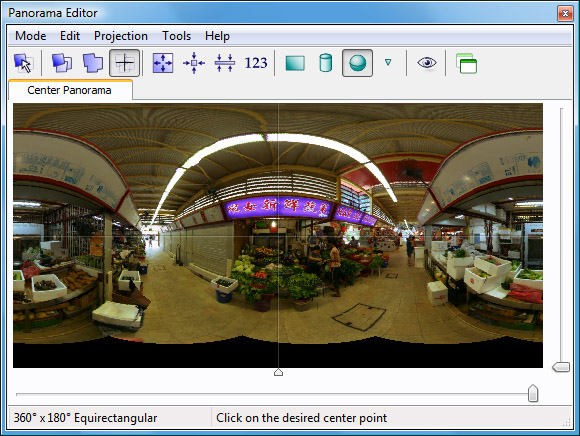
In this class, unlike the VFX class I did in 3rd year, we used a camera with a fish-eye lense, tripod and a panorama tripod head instead of the chrome ball to take the images of the environment. 


The quality of the images was significantly higher than the chrome ball images and the creation of the HDRs and panoramas of the environment was much easier as we used a specialised software called PT Gui.

                                                                                           (Panorama Editor - PT Gui)


After this,  I've decided that this would be the best method for the IBLs for the Mastronauts project and this is the route that we will be taking from here on out.

Thursday, 6 February 2014

Week 19: Mastronauts - looking at IBLs continued

So using Photoshop to combine the different exposures we make a HDR image for each shot.


The next step was just to merge the images together in nuke and create a panorama-styled image of the room.


So in Nuke I carried out a few tasks to unwrap the images and merge them together. It required a little tweaking and editing because we only took three images around the ball. I think more would have been better. Nevertheless it seemed to be coming together.


Over-all I am quite happy with the outcome. Of course, because the ball was not completely smooth and had some scratches, the image displays some of these imperfections but I don't think it will be a major issue for what we need.


Tuesday, 28 January 2014

Week 18: Mastronauts - looking at IBLs

 After having done the Visual Effects module in 3rd year, I have done a little work with IBLs using the chrome ball. Discussions with Tom & Kieran have made clear that we will be needing to use this method of lighting for the character in our film.

So I began looking at creating HDR of a room using a chrome ball.


           As this is just the first test, we only took 3 different exposures per image.